
Run every incident like you rehearsed it.
Incident Lake is an AI incident commander that lives in Slack and Microsoft Teams. It runs drills before anything breaks, coordinates the response in the thread when it does, and keeps the GDPR clock and the postmortem moving afterward.
It proposes. Your responders decide.

PROBLEM
Sound familiar?
You hear about it last
During a major outage, updates reach you second-hand and in fragments. You can't tell customer impact or a realistic recovery time until someone finds a moment to write it up.
A status page and dashboards show affected services and response status in real time.
Regulators and customers will ask
A breach starts a notification clock, and later someone will ask who knew what, and when. Reconstructing that from chat history is a risk in itself.
The GDPR 72-hour clock is tracked from awareness, and every decision lands on the timeline and in the audit log.
Resilience lives in a few heads
A handful of senior engineers know how to run a bad night. When they are on leave or move on, response quality drops, and the drills that would fix it never get scheduled.
The agent runs the same checkpoints every time, and industry tabletop drills turn tribal knowledge into process.
Nobody grabs the wheel
The alert fires, half the team piles into the channel, and it takes too long to agree who is commanding and what matters first.
The agent proposes a commander, severity and affected services, and asks the team to confirm each one.
You become the status update
Instead of steering the response, you spend the incident relaying updates upward and chasing people for answers.
Tasks, reminders for open questions and approval-gated stakeholder emails are handled for you.
Action items go to die
The postmortem slips, the follow-ups sit in a doc nobody reopens, and the same incident comes back next quarter.
Postmortems are drafted for you, and follow-ups are tracked to done in improvement and problem management.
A wall of alerts, one problem
One root cause, a wall of alerts, and step one is working out which ones belong together.
Related alerts from your monitoring tools are grouped into a single incident.
Debugging while narrating
You are flipping between dashboards, logs and old runbooks while also explaining everything in the channel.
The agent pulls context from monitoring, code and knowledge (read-only) and cites its sources.
The paperwork after the fix
Service is back, but the timeline, the report and the postmortem still have to be pieced together from memory.
The timeline and report are drafted from the conversation and the record as you go.
Different seats, different pain. One agent that covers all three.
BEFORE / DURING / AFTER
One agent for the whole incident lifecycle
01 Readiness
Drills and a built-in CMDB
Generate tabletop scenarios for your industry, inject cards on a schedule, keep facilitators and players separate, and get the debrief written for you. Map services, dependencies, sites and suppliers so you know the blast radius before you need it.
Explore drills →02 Response
An incident commander in the thread
Alerts from Datadog, Grafana, Sentry and others open an incident and roll related alerts into one. The agent proposes a commander, severity and affected services, turns decisions into tasks and chases open questions. A meeting bot summarizes the bridge call into the record.
How response works →03 Learn & comply
Clocks, evidence and postmortems
Enter when you became aware of a breach and the GDPR 72-hour deadline is tracked for you. Postmortems and reports are drafted from the record, exported to PDF or Word, and follow-ups flow into problem, change and improvement tracking.
Compliance deadlines →Regulatory information on this site is general in nature and is not legal advice. Confirm notification obligations and deadlines with your regulator's guidance and qualified counsel.
FEATURES
Features
FEATURES - 01
An autonomous agent that joins your chat threads
and runs the first response
Triggered by an alert or a quick "@Incident Lake go," the AI agent joins the thread. It sorts out the situation and builds the incident record, confirming the incident commander, severity, and affected services one step at a time. Final severity and response decisions always stay with people: AI proposes, humans decide.
FEATURES - 02
Shows what to do next
and tracks progress until recovery
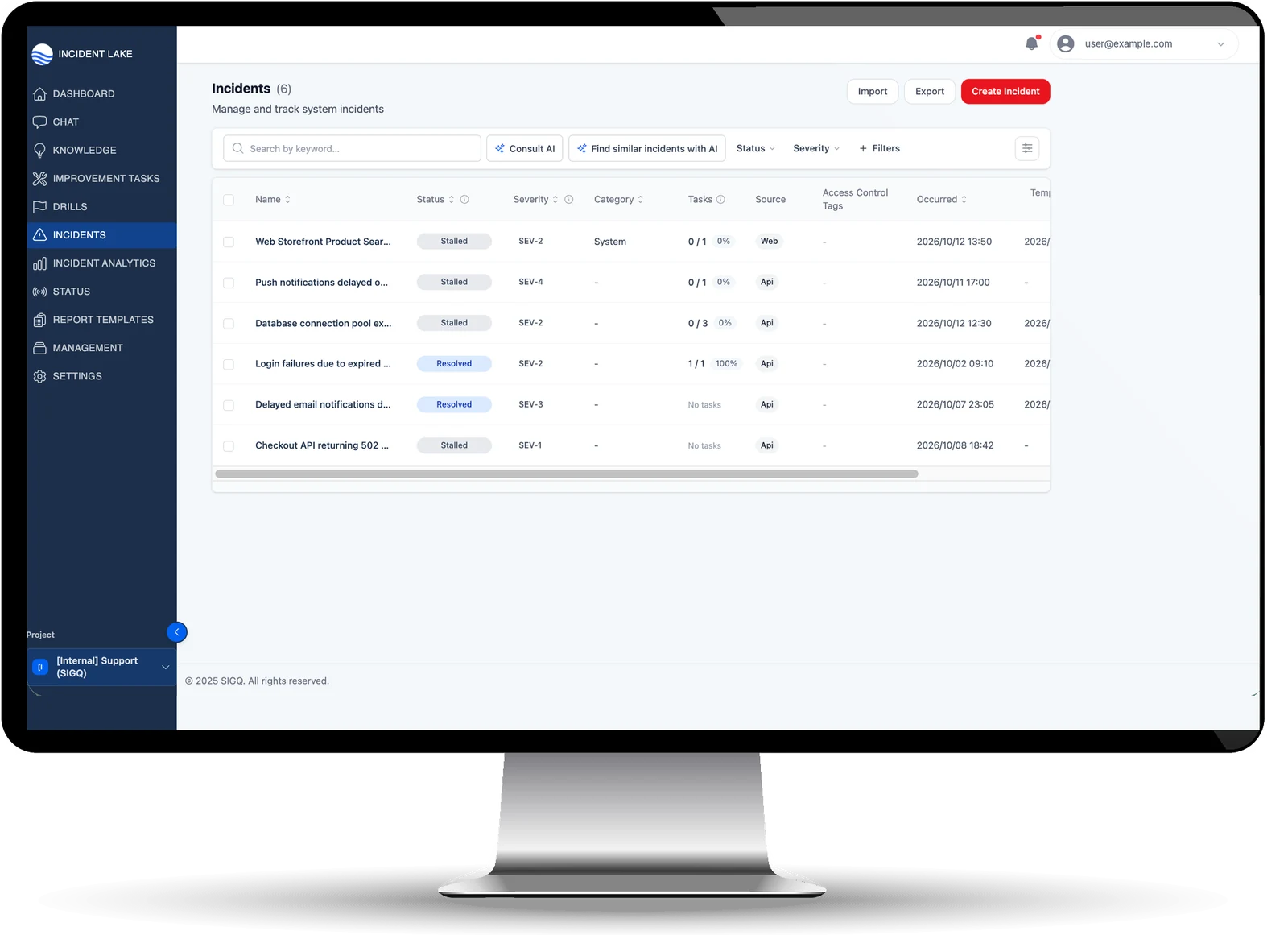
From assigning tasks and nudging on unanswered questions to confirming alerts have calmed down and detecting recurrences, the AI handles the coordination work a PM would normally own. It also detects recovery times (detection, mitigation, and permanent fix) from the record, making delays visible.
FEATURES - 03
Investigates on its own across monitoring and chat,
with evidence for every answer
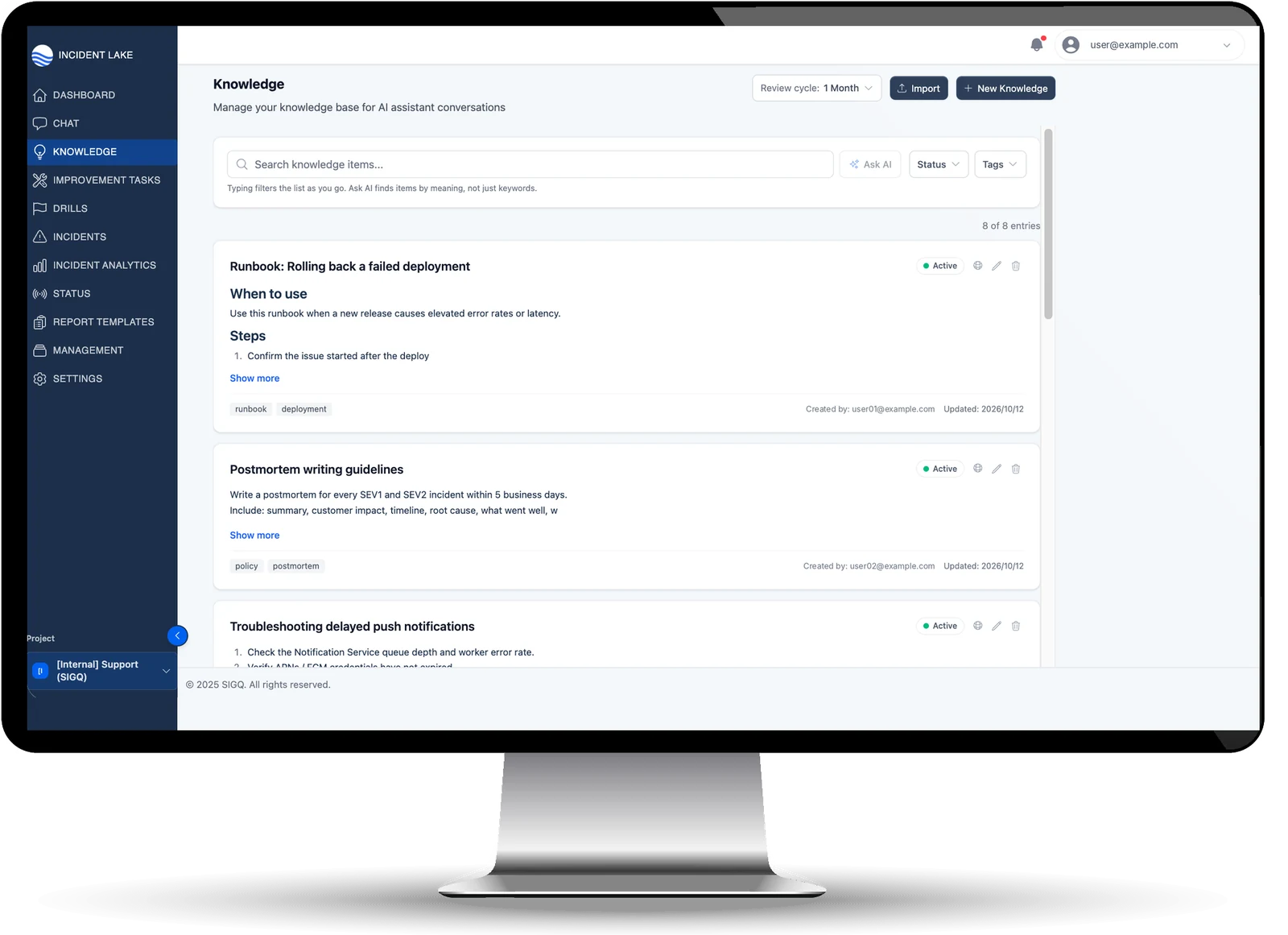
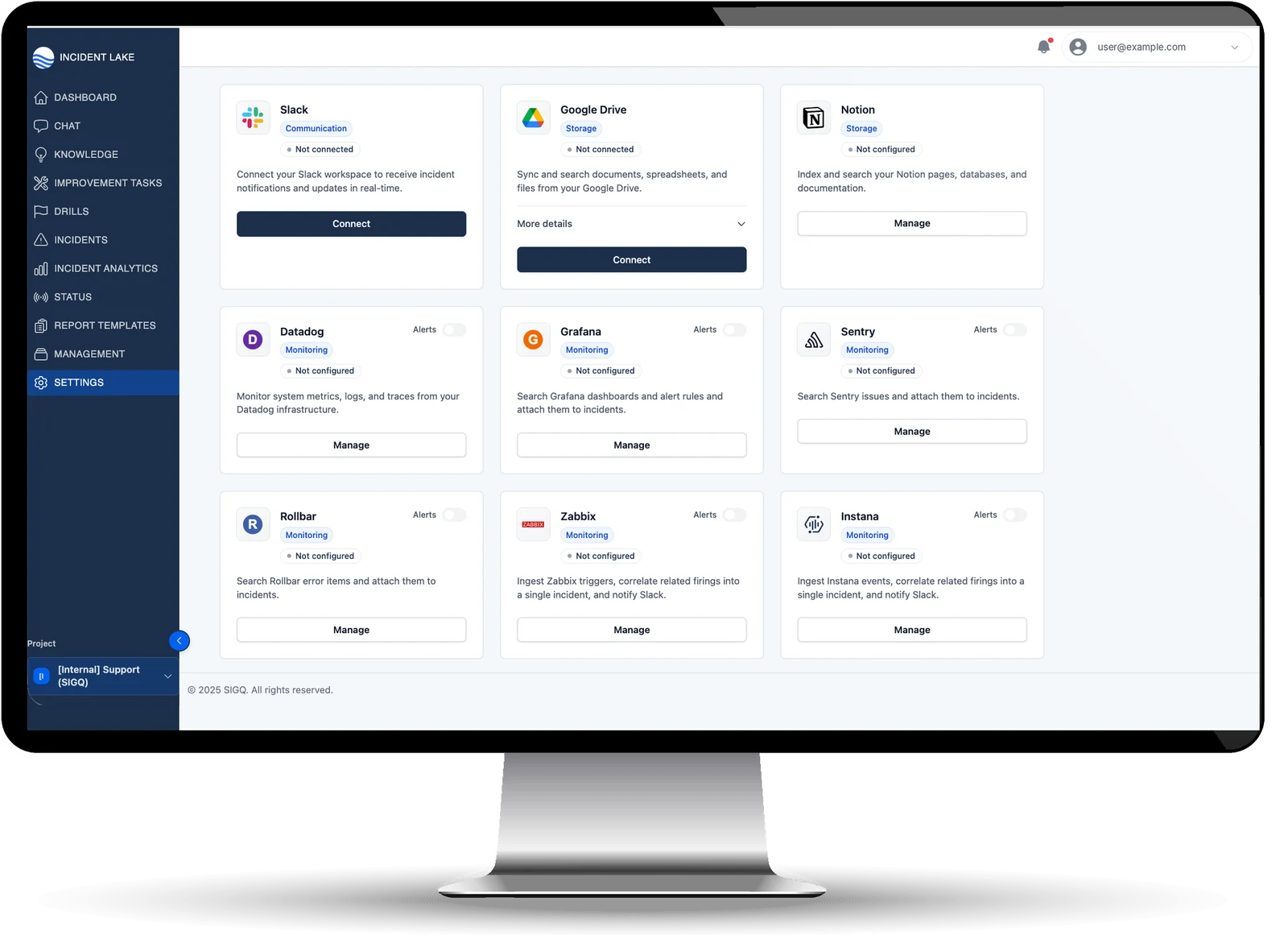
The agent pulls context from Datadog, Sentry, Grafana, Instana, Rollbar and Zabbix, plus GitHub, Notion and Google Drive, without write access to any of them. Answers come with Verified Sources: the runbook, the past incident, the commit. Ticket sync to Jira, Backlog or ServiceNow is two-way only when an admin enables it.
FUNCTION
Key functions
Autonomous incident response agent
Supports you in Slack / Teams threads from triage to resolution. It asks one question at a time and completes the incident record with human confirmation.
Next-action suggestions
Determines what to do next based on the incident's status, so nothing slips through the cracks: assigning a commander, creating tasks, or writing the report.
Auto-drafted reports and postmortems
AI drafts the summary, timeline, and postmortem from conversations and records. Your team just reviews and refines.
Progress tracking and reminders
Automatically follows up on unstarted tasks and unanswered questions, and after recovery watches for alerts to calm down and for recurrences. Keeps the response from stalling.
Knowledge and runbooks at work
The AI references approved runbooks and past incidents and answers with evidence, turning your organization's tacit knowledge into better next responses.
Integrations with your existing tools
Slack (multi-workspace) and Teams. Datadog, Sentry, Grafana, Instana, Rollbar, Zabbix and Outlook alert mailboxes. GitHub, Jira, ServiceNow, Backlog. Notion, Google Drive, NetBox. Statuspage, a meeting bot for Zoom, Meet and Teams, a Public API and a remote MCP server.
Incident analytics and executive visibility
Dashboards show incident volume, recovery times, and recurring patterns, with separate views for executives, operations, and response teams.
Human-in-control design and security
Switch the agent's level of assistance to "Only when needed" or "Off" at any time. Supports audit history, permission groups, and SSO.
ITIL 4
Evaluate us in the language of ITIL 4
Incident Lake works alongside your existing service desk and ITSM platform, covering incident, problem, and knowledge management in depth. We have mapped which areas it covers, and how far, along ITIL 4 practices.
◎ Core
Incident, problem, knowledge, and service continuity
In-depth coverage from automatic prioritization and major incident declaration to known error management and incident response exercises.
◎ Core
Change, release and configuration (CMDB)
Changes come in from GitHub or are logged by hand, so you can see which deploy preceded an outage. A built-in CMDB maps configuration items, service dependencies, sites and suppliers, and syncs with NetBox and ServiceNow.
Integrated
Service request and service desk
Keep your service desk. Incident Lake connects to ServiceNow, Jira and Backlog instead of replacing them.
* ITIL® is a registered trade mark of the PeopleCert group.
REPORT
Research Reports
Original research on incident response and resilience, ready to use in discussions with leadership and front-line teams.
RESEARCH REPORT
Assess where you stand
with a resilience maturity matrix
Resilience Requirements and Security Investment: What Companies Need to Know
Requirements from domestic and international regulations, organized into 8 dimensions × 5 levels. Includes survey data (n=250), case studies and JCIC investment benchmarks.
Learn more →
SURVEY REPORT
250 SRE and engineering leaders on
dependency, causes and risks
Survey on Individual Dependency in Incident Response 2026
72% say incident response depends on one or two people, and 88.9% of them see a risk those people may leave. Eleven questions on the causes and on which countermeasures work.
Learn more →


SECURITY
Security
The information Incident Lake handles, such as your infrastructure operations data and incident response history, is highly confidential and core to your business. SIGQ Inc., the company behind Incident Lake, is certified to ISO/IEC 27001, the international standard for information security. Incident Lake has also received a SOC 2 Type 1 report, so your data is protected under an internationally recognized security framework.


FAQ
FAQ
FLOW
How it works
STEP 01
Discovery and current-state analysis
We start by learning about your incident management challenges and current operational workflows, pinpointing where information is scattered and where your team hits bottlenecks.
STEP 02
Proof of concept (PoC) design
We define the success metrics to validate, such as shorter recovery times and less reporting effort, and set up an environment to test Incident Lake's fit using a subset of your real data or simulated data.
STEP 03
Importing existing logs and runbooks
We import past incident logs and manuals to build the knowledge base the AI agent draws on. Scattered information becomes structured and usable as evidence behind every suggestion.
STEP 04
Integrations and agent trial run
We connect your monitoring tools and Slack / Teams, then trial the AI agent in real threads, prototyping a response flow your team can adopt without friction.
STEP 05
Impact validation and ROI
Based on the PoC results, we assess how well Incident Lake addresses challenges across your organization, quantify the effort savings and risk reduction of a full rollout, and help you build the internal business case.
STEP 06
Full rollout across your organization
Go live with a configuration optimized from the PoC findings. A dedicated engineer works alongside you to embed a company-wide culture of knowledge sharing and continuously advance your risk analysis.
PRICING
Plans, not per-seat pricing
Free plan / Free
Get started right away at no cost. Includes a monthly AI credit allowance, up to 5 members, 1 Slack / Teams integration, 1 monitoring integration, and up to 20 knowledge items.
Team plan / Monthly
A monthly plan for team adoption. Includes a monthly AI credit allowance plus overage within your budget, up to 25 members, 20 auto-detection channels, 3 monitoring integrations, 50 knowledge items, and permission groups.
Annual plan / Yearly
A 12-month contract for company-wide rollout. Includes an annual AI credit allowance, unlimited members, integrations, and knowledge items, audit logs, SAML SSO, Public API, and onboarding support. Available in four tiers: Growth / Scale / Enterprise / Custom.
Capped pay-as-you-go pricing is also available during the PoC.
Contact us anytime for detailed pricing.
FREE TRIAL
Try it for free
and see for yourself
Two fields, about two minutes. We set up your workspace and email the login, usually within one to three business days. No sales call unless you ask for one.